
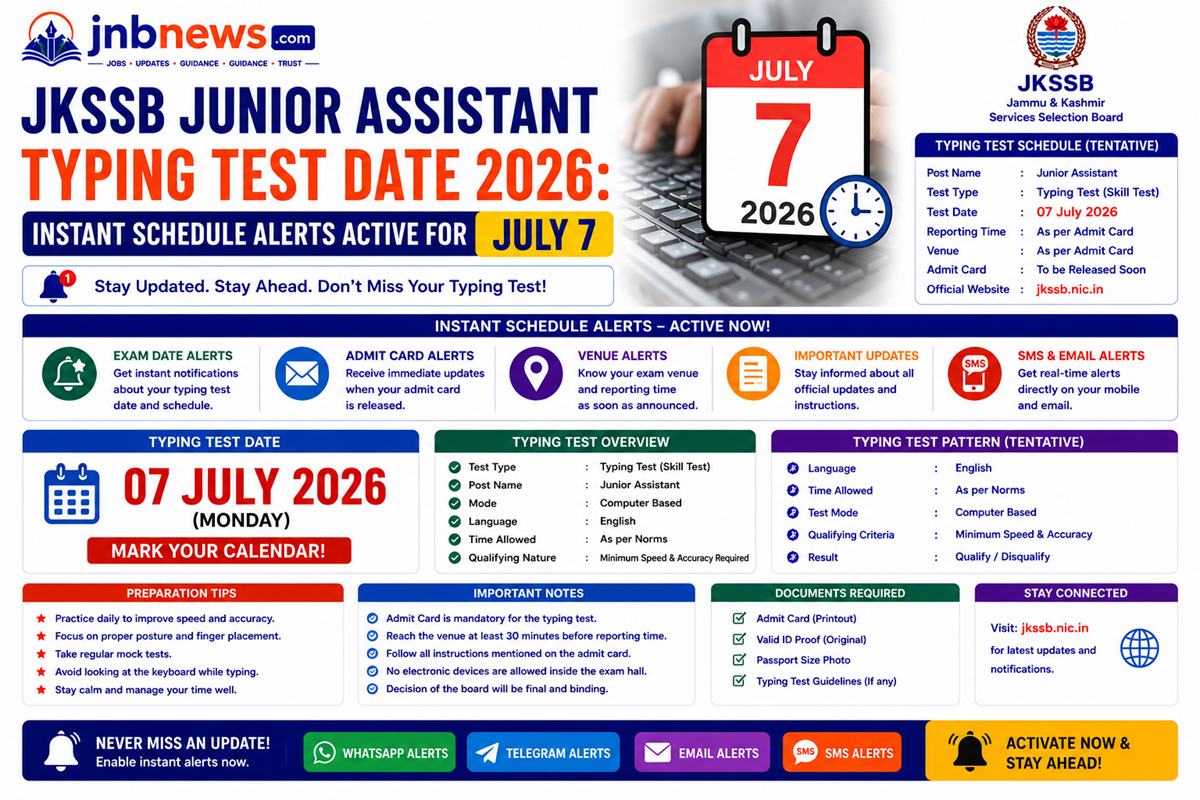
JKSSB Junior Assistant Typing Test Date 2026: Instant Schedule Alerts Active for July 7
Quick Answer
To build a massive competitive edge across regional clerical cadres, keeping close tabs on the JKSSB Junior Assistant Typing Test Date 2026 timeline is an absolute operational necessity. Formally authorized by the Jammu and Kashmir Services Selection Board, the mandatory computer typing and skill test phase is officially scheduled to commence on July 7, 2026. This active testing block follows the successful completion of the offline OMR-based written screening exam held on April 19, 2026, to process 343 vacancies under Advertisement No. 08 of 2025. Shortlisted aspirants can verify their specific venue coordinates, batch timing allocations, and download their skill test cards safely by visiting the Official JKSSB Government Portal.
Introduction
Reaching the specialized typing evaluation phase of the Jammu and Kashmir civil services framework is an outstanding milestone for any dedicated professional. For hundreds of competitive test-takers across the Union Territory, managing the exact parameters of the JKSSB Junior Assistant Typing Test Date 2026 framework is highly vital for establishing your final rank standings. True professional progression cannot rest on unverified social channel gossip or casual chat predictions; it demands a structured look at the precise evaluation rules, formatting scripts, and machine settings managed by state regulators.
Relying entirely on soft laptop keypads or delaying your timed 10-minute drills can cause your execution speeds to fold under pressure on testing mornings.
To guarantee your skill processing encounter faces zero technical or administrative delays, this comprehensive manual provides an authentic approach to handling your daily keyboard preparation loops. By combining real-world candidate dashboard practices with official board metrics, we break down how selection points are awarded, explain the 90% accuracy guardrail, and show you how to structure your core practice blocks with absolute peace of mind.
Navigating the Examination Menu Pipeline
Staying fully informed during high-stakes preparation runs becomes incredibly simple when you follow a structured sequence. Official civil service documents are arranged in a specific order to streamline your tracking process:
- Exam Notifications & Job Advertisements: The primary structural files that outline active job openings, specific reservation grids, and age parameters.
- Admit Card Releases & Skill Test Venues: Operational assets required to verify your specific typing batch timings, testing lab coordinates, and machine allocation rules.
- Result Announcements & Composite Roster Lists: Post-exam processing files used to view final cut-off listings, analyze combined typing and written scores, and trace provisional appointments.
The Importance of Root-Level Verification
While using aggregated tracking tools saves huge blocks of daily research time, serious administrative aspirants must maintain a reliable habit of root-level confirmation. Vital adjustments regarding shifting medical board dates, descriptive re-totaling deadlines, or physical certificate parameters must always be checked directly on the official state portal before making final career updates. This protective routine shields your profile from unverified web modifications.
Technical Architecture of the Proportional Marking System
The scoring architecture under the JKSSB Junior Assistant Typing Test Date 2026 framework uses a dual-tier evaluation system to compile final merit listings across the state’s secretarial portals:
[Composite Selection Formula] = [Computer Typing Test: 20 Points] + [Written OMR Exam: 80 Points]
1. The 20-Point Skill Allocation Rule
Unlike pure qualifying tests, your physical typing execution directly impacts your final merit placement. The 20 marks are awarded proportionally based on your achieved net speed above the 35 WPM baseline. A candidate who scores exactly 35 WPM receives the minimum passing score entry, while faster typing speeds pull higher point splits up to the maximum 20-point ceiling, giving you an immediate strategic advantage over slow typists.
2. Automated Software Assessment Scripts
The board conducts the test inside specialized computer labs utilizing proprietary automated evaluation software. Candidates are provided a printed or on-screen text passage containing a mix of alphanumeric characters, punctuation marks, and standard grammatical prose. The system records your real-time keystrokes over a tight 10-minute continuous typing window.
Crucial Speed and Accuracy Calculation Metrics
Succeeding under modern Union Territory civil service cycles requires matching your technical routines with the exact operational standards checked by system evaluation algorithms.
Understanding Gross vs. Net Typing Speed
The automated grading machines evaluate your daily keyboard executions using standard typing metrics:
- Gross Words Per Minute (GWPM): Calculated by taking your total keystrokes typed (including spaces and punctuation) divided by 5, and then dividing that sum by the 10-minute time constraint.
- Net Words Per Minute (NWPM): The absolute speed value that determines your passing status. It is computed by taking your total Gross Words and subtracting all uncorrected errors or misspelled words, divided by 10.
The Strict 90% Accuracy Guardrail
Achieving high raw speed means nothing if your execution drops below the accuracy baseline. The board explicitly mandates that your net correct words must constitute at least 90% of your total typed volume. Dropping to an accuracy of 89.9% results in immediate disqualification, regardless of whether your raw speed exceeded 40 or 50 WPM.
Step-by-Step Blueprint to Configure Your Daily Drills
Follow this practical, code-compliant routine to analyze the previous test patterns, set up your practice workspace, and build typing speed safely.
1. Calibrate Your Physical Hardware Configuration
Replicating real-world examination lab environments early stops you from folding under muscle tension on test morning.
- Step away from soft, shallow laptop keyboards or ergonomic gaming keypads.
- Connect a standard, full-sized membrane USB desktop keyboard featuring standard travel distances and high-resistance keys.
- Maintain a straight typing posture with your elbows bent at a clean 90-degree angle to keep your hand movements consistent during the 10-minute drill.
2. Deploy Local Typing Simulation Tools
Train your touch-typing muscle memory strictly around the multi-paragraph prose formats checked by board scanners.
- Configure offline simulation tools or open interactive online layouts like TypeRacer or 10FastFingers.
- Paste analytical government notifications or regional history texts into your practice software to get used to typing complex words and numbers.
- Set your parameters to run for a full 10-minute countdown window, and focus on maintaining a steady rhythm rather than bursts of speed to keep your accuracy high.
3. Track Auxiliary Regional Resource Linkages
To access additional background analyses and external reporting covering regional civil service updates, view our specialized tracking partners:
- Read More Information on https://jnbnews.com
Common Pitfalls Candidates Must Avoid
Protect your preparation timeline from common administrative errors by keeping these exam-stage pitfalls in mind.
Entering Inaccurate Data Values Inside Your Profile
Entering incorrect graduation percentages or selecting the wrong community category options just to complete a form quickly can cause serious issues later. Even if you clear the high cut-off scores of the written phases, any mismatch between your digital form data and your physical certificates will lead to immediate disqualification during document verification. Treat every profile entry with absolute accuracy.
Looking Frequently Between Your Keyboard and the Screen
Relying on your eyesight to check individual keys instead of using strict touch-typing habits slows down your processing speeds significantly. This bad habit causes you to lose your place in the reference text, leading to skipped lines and double-typed words that trigger the 90% accuracy penalty. Keep your eyes locked on the target text block and trust your fingers to locate the correct keys.
Comprehensive Selection Verification Matrix
The detailed table below outlines the core parameters established across previous secretarial skill cycles.
| Evaluation Stage Tier | Minimum Speed Cutoff | Mandatory Accuracy Gate | Maximum Score Weightage | Primary Hardware Target |
|---|---|---|---|---|
| Computer Skill Phase | 35 Words Per Minute | 90% Correct Execution | 20 Marks (Proportional) | Standard Full-Sized Keyboard |
| OMR Written Phase | Category-Specific Cutoff | No Accuracy Cap Enforced | 80 Marks (Objective Style) | Offline Pen & Paper Booklet |
Pros and Cons of Curated Selection Monitoring
Pros
- Eliminates Gate Timing Panic: Organizing your certificates and diplomas weeks ahead of time ensures your portal submission goes smoothly.
- Isolates Core Skill Targets: Breaks down the exact speed and accuracy formulas so you can balance your daily keyboard practice.
- Saves Critical Study Hours: Gathers scattered department circulars into a single clean interface, freeing up more hours for your typing practice.
Cons
- Demands Personal Profile Entries: Curation guides map out the processes, but downloading individual call sheets or batch schedules always requires logging into your secure account space.
Frequently Asked Questions
Where can I check the official JKSSB Junior Assistant Typing Test Date 2026?
The comprehensive upcoming skill test batch schedules, hall tickets, and center instructions can be accessed directly on the Official JKSSB Government Portal.
On what official date are the computer typing tests slated to commence?
The selection board has finalized its logistical arrangements and officially scheduled the typing test launch for July 7, 2026.
What is the absolute minimum typing speed required to pass this stage?
Candidates must achieve a minimum net typing speed threshold of 35 words per minute (WPM) to clear the skill phase.
What is the mandatory accuracy baseline enforced by the board software?
Your net correct entries must constitute at least 90% of your total typed volume inside the 10-minute script window to prevent automatic disqualification.
How do typing test scores impact the final selection rank rosters?
The skill phase carries a 20-mark weightage within a 100-point composite formula; marks are awarded proportionally based on your net speed above 35 WPM.
What keyboard layout is used during the official state skill evaluations?
The automated testing terminals use standard desktop computers equipped with English QWERTY keyboard layouts.
Can I use the backspace key to correct spelling mistakes during the test?
Yes, standard previous evaluation layouts allow the use of the backspace key to fix errors, but the time spent making corrections counts against your overall speed.
Is a local domicile certificate required to participate in the typing slots?
Yes. Every candidate must hold a valid Domicile Certificate of the UT of Jammu and Kashmir issued by competent revenue officers to remain eligible for selection.
What is the total time duration of the computer typing test?
The automated evaluation software monitors and logs your keyboard actions over a strict 10-minute continuous typing window.
How often should active candidates practice timed keyboard simulations?
Practicing full-length, 10-minute text blocks two to three times a day using a physical desktop keyboard is an exceptionally effective routine for building muscle memory and confidence.
Final Verdict
Analyzing the JKSSB Junior Assistant Typing Test Date 2026 schedules systematically is an essential first milestone toward securing a decorated public service clerical career. By moving away from unverified social media chatter and using an organized, step-by-step approach through official portals, you can keep your preparation schedule perfectly on track. This systematic focus protects your candidate profile from unexpected errors and ensures your technical documentation aligns with current requirements, letting you approach the upcoming test with complete confidence.
If you are ready to review your qualifications or check your target department codes, make the official government server links a regular stop in your daily routine. By keeping your administrative timeline perfectly organized, you can approach your technical goals with peace of mind and secure your milestones smoothly.
Technical Resources and References
External References
Review official notification logs, structural changes, and candidate system frameworks directly from primary state authorities:
- Jammu and Kashmir Services Selection Board Document Archives: https://jkssb.nic.in/
- JKSSB Online Candidate Portal Login Terminal: https://jkssb.nic.in/candidate/login
JKSSB Exams Calendar & Typing Test Updates provides a detailed look at active board timelines, upcoming clerical evaluations, and specific preparation tips tailored for this active cycle. This video resource is highly relevant because it features a clear natural language overview explaining exactly how to organize your daily desktop typing drills to meet upcoming deadlines safely.